ReadEra Premium – ebook reader
- 4.8
- Rating
- 100.00K
- Installs
- $14.99
- Price

 Analysis by App-foxy
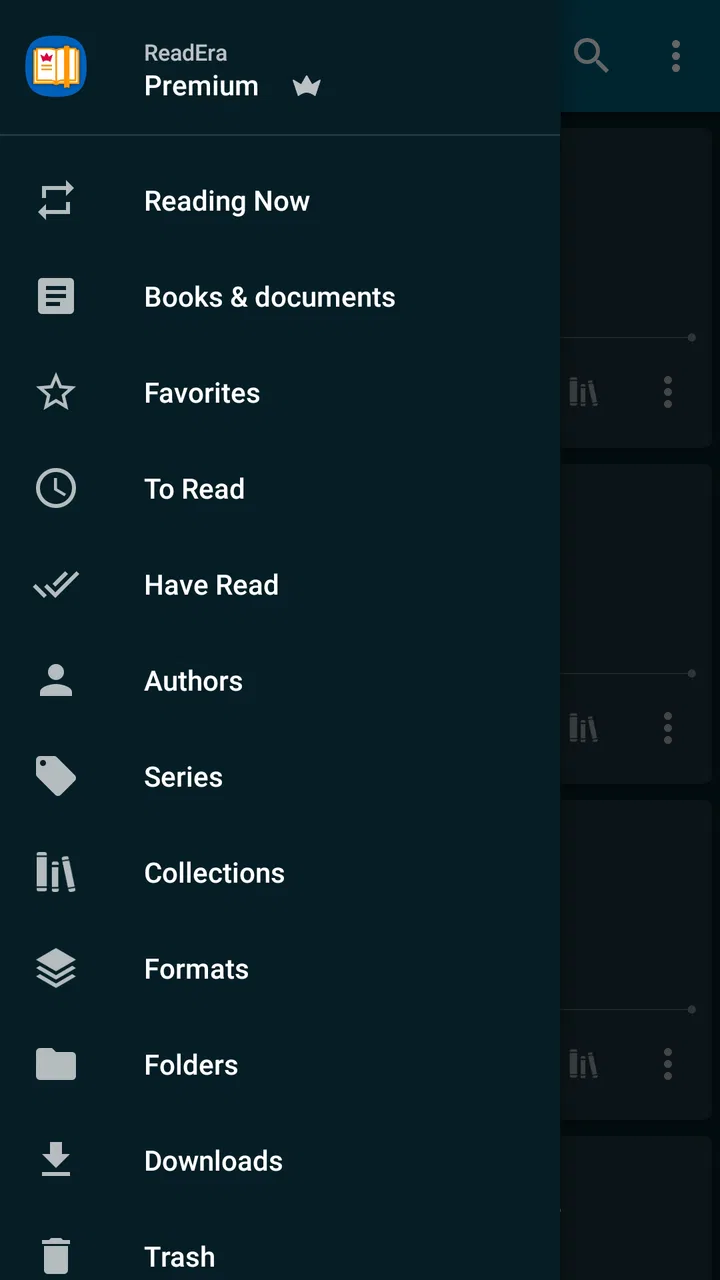
I usually judge an ebook reader by what happens after the initial download: can I get back to my reading quickly, keep my library understandable, and continue without fighting the interface? ReadEra Premium, from READERA LLC, is aimed at that practical part of reading. It is a Books & Reference app for handling PDF, EPUB, and MOBI files, with a library view intended to keep those documents together rather than scattered across file folders.
After spending time with it, my impression is that this is less about recreating a bookstore and more about turning a phone or tablet into a personal reading cabinet. That distinction matters. If you want recommendations, a built-in marketplace, or a social reading network, this is not the direction I would choose. If you already have books and documents and want one place to open and organize them, the concept is much more convincing.
The app has a 4.8 average from around 65 thousand ratings, with more than 100 thousand installs, which gives it a strong level of visibility among Android readers. It is rated for Everyone, costs $14.99, and the current version is 26.05.20+2300. It has been available since December 21, 2019, and supports Android 4.1 or later, so its stated device reach is broad even though the reading experience will naturally depend on the screen and performance of the phone or tablet.
You May Also Like

 Blood Strike: 2.5 Anniversary
Blood Strike’s Loadouts Turn Every Drop Into a Tactical Gamble
A close look at Blood Strike’s custom loadouts: how fast access to signature weapons reshapes its battle royale rhythm, rewards preparation, and narrows the gap between fights.

 Pandora - Music & Podcasts
Pandora’s Music Is Easy to Start, but Harder to Recover
Pandora’s strength is its low-effort path from a seed to a station. Its weak spot is how much confidence it asks you to place in connection, setup, and quiet recovery.

 8 Ball Pool
 Is Built on Rivalries, Rematches, and Routine
A close look at the rivalries, rematches, shared routines, and unanswered safety questions that turn a quick pool match into a persistent mobile community.

 Samsung Music
’s Quiet Strength Is Playing What You Already Own
Its reach comes less from spectacle than from dependable access to a personal library. That simplicity is both the app’s strongest retention engine and its ceiling.

 AccuWeather: Weather Radar
AccuWeather Review: A Quick, Clear Forecast for Everyday Decisions
For everyday plans, the best forecast is the one you can understand quickly. AccuWeather makes rain timing, radar, and local conditions easy to act on, with a few trade-offs.

 Hill Climb Racing
Why Hill Climb Racing Still Turns Crashes Into One More Run
A tiny car, a bumpy hill and one more upgrade: Hill Climb Racing keeps resurfacing because its simple chaos makes every near-miss feel personal.
More From Our News Desk



Reading when your connection is part of the problem
The most important connectivity question is not simply whether an app opens a book. It is what the app asks you to do before and during that moment. ReadEra Premium is built around files you bring into the reading environment, rather than around a catalog that must be browsed inside the app. That makes the network story feel different from a subscription reading service: your first concern is obtaining or transferring the document, while the reading interface is where you spend your time afterward.
I would therefore think of it as a useful second step in a reading workflow. A book might arrive through an email attachment, a cloud storage service, a computer transfer, or another file-sharing route. Once the document is available to the device and recognized by the app, the value of ReadEra is having a consistent place to read it. This separation is convenient, but it also means the app does not remove every connectivity decision. You still need a sensible way to acquire your files in the first place.
That distinction is especially helpful for PDFs. A PDF may be a novel, a manual, a course handout, or a long report, and those uses do not all benefit from the same layout. EPUB and MOBI books tend to behave more like reflowable reading material, while PDFs preserve their page design. I found that the choice of format matters more than many new users expect. If a document feels awkward, the limitation may come from the document itself rather than from the reader.
For a person who regularly moves between a home connection and unreliable public networks, this file-centered approach can reduce unnecessary dependence on a live service. Still, I would not interpret that as a promise that every part of the experience is independent of connectivity. File discovery, transfers, account-based storage elsewhere, updates, and any outside source you use remain separate considerations. The sensible approach is to prepare the documents you expect to need before leaving a dependable connection.
A realistic commute workflow
Imagine that I am leaving home with a long PDF for a class, an EPUB novel, and a MOBI document sent by a colleague. Instead of opening three different apps and searching through recent files, I would bring those documents into the same reading library and use the reader according to the format. On a train, I can concentrate on the material rather than trying to locate an attachment again. If the connection drops during the trip, the important preparation has already happened: the files are where I expect them to be.
This is also where the premium positioning makes sense to me. I am not paying for a store full of books; I am paying for a more deliberate reading workspace. That is worthwhile for someone who reads across several file types every week. It is harder to justify for someone who only opens an occasional document and is already satisfied with the basic viewer included with a phone or cloud service.
Why the phone experience is useful but not automatically ideal
On a phone, the app’s biggest advantage is consolidation. A small screen encourages quick reading sessions, but it also makes file management frustrating when every document is handled by a different tool. Keeping books in a library gives me a better chance of returning to the right title, especially when I switch between fiction and practical documents.
There is a trade-off, though. A phone is convenient for a spare ten minutes, but it is not a perfect substitute for a larger screen. PDFs with dense tables, wide pages, or small type can require repeated zooming and repositioning. That is not a reason to reject the app; it is a reason to match the format to the device. I would use a phone for novels, short documents, and quick reference, then move demanding technical PDFs to a tablet or larger display when possible.
On a tablet, the library concept becomes more valuable because the extra space makes longer reading sessions less tiring. A tablet also gives a PDF more room to breathe, reducing the need to inspect every page as if it were a photograph. Even then, I would not assume that a larger screen fixes every poorly designed document. A scanned page, an unusual page size, or a file with tiny embedded text can remain inconvenient.
The app’s minimum operating-system requirement is Android 4.1, which is unusually accommodating for people using older hardware. That does not guarantee identical speed or polish across every device. Older phones may have slower storage, smaller displays, or less comfortable multitasking. My advice would be to judge the app against the actual reading habits you have, not just against whether the phone technically meets the requirement.
Keeping different kinds of books under control
A mixed library is where I see the clearest everyday benefit. PDF, EPUB, and MOBI files often arrive from different places and follow different naming habits. Without a central reading app, it is easy to forget where a title was saved or confuse a document with an earlier copy. ReadEra’s library-oriented design gives me a more natural starting point: I look for the book as a book, not as a file buried in a download folder.
That sounds simple, but it changes how I handle reading projects. For example, I might keep a reference PDF beside an EPUB textbook and a MOBI novel. The reference document is for searching and checking details, the textbook is for longer study sessions, and the novel is for relaxed reading. Treating them as one personal collection makes the phone feel less like a pile of incoming files.
My practical tip is to decide on a file-naming habit before importing a large collection. Clear author and title names are more useful than leaving everything with the original download label. No reader can completely rescue an untidy archive. A clean source library makes ReadEra easier to use, while a chaotic one can make any ebook app feel disorganized.
When reading is interrupted, moved, or unexpectedly broken
Connectivity is only one kind of interruption. Battery limits, incoming messages, changing locations, and switching between documents all test whether an ebook reader feels dependable. I value an app that lets me return to a book without rebuilding the context each time. With ReadEra Premium, the central workflow is straightforward: open the library, identify the document, and continue with the reading task rather than navigating through a general-purpose file manager.
That workflow is particularly useful when I use a document in short bursts. A recipe collection, instruction manual, or study handout may not be something I read from beginning to end. I might open it while standing in a kitchen, on a bus, or beside a desk, check one section, and close it again. A library made for reading is better suited to that pattern than a generic file browser that treats the document as an anonymous attachment.
Recovery becomes more complicated when the file itself is the problem. A damaged document, an incomplete transfer, or an unusually formatted PDF can create symptoms that look like reader failures. My habit is to test the same file with another viewer before blaming ReadEra. If the file fails everywhere, replacing or reobtaining it is more productive than repeatedly changing reader settings.
There is another useful distinction: a reader can be good at displaying a file without being the best tool for editing it. I would use ReadEra to read, inspect, and organize my documents, but I would not choose it as my main workspace for rewriting a PDF, creating a document, or performing serious annotation-heavy editing. People who need a full document editor should keep that separate from their reading app.
Managing storage without creating a second mess
Using a library does not eliminate the need for storage discipline. Large PDFs can accumulate quickly, especially when several versions of the same manual or report are imported. I recommend periodically removing duplicates from the source folders and keeping only the version I actually intend to read. Otherwise, the library becomes a record of every download rather than a useful selection of current material.
This is one of the less obvious trade-offs of a file-based reader. The freedom to bring in documents is excellent for personal collections, but it shifts responsibility to the user. A bookstore app may make purchasing and cataloging feel automatic; ReadEra gives me more control, but I have to maintain that control. For readers who enjoy managing their own files, that is a fair exchange. For readers who want everything synchronized and curated for them, it may feel like extra work.
I would also keep important documents in a separate, reliable location rather than treating the reading app as the only copy. A reader is a place to access material, not a replacement for a sensible backup routine. This matters for study notes, work documents, and personal records that would be difficult to obtain again.
Using it carefully on limited data
If I am trying to conserve mobile data, I would organize the reading session around preparation. I would transfer or obtain the books while connected to a trusted network, then avoid repeatedly fetching the same files through different services. The app’s usefulness in this situation comes from making the reading step separate from the acquisition step, not from assuming that every surrounding service behaves the same way.
That approach also helps with travel. Before a trip, I would open the documents I expect to use, check that the correct versions are present, and remove unnecessary duplicates. For a long journey, I would include a mix of formats rather than relying on one enormous PDF for every purpose. An EPUB novel is generally a more natural phone companion than a fixed-layout report, while a PDF remains the right choice when page design and diagrams matter.
People who read only through online services may find this preparation less attractive. Their preferred system may handle access, synchronization, and catalog discovery in one connected environment. ReadEra Premium is more appealing when I already own or receive files and want a focused reader around them. The choice is not simply about which interface looks nicer; it is about whether I prefer managing documents myself or letting a service manage the whole reading pipeline.
Who should choose it, and who should look elsewhere?
I would recommend it to students carrying course PDFs, professionals who consult manuals and reports, readers with personal EPUB collections, and anyone tired of opening every book through a different file utility. It is also a sensible option for households or individuals using older Android hardware, provided the device remains comfortable for the documents involved.
I would hesitate if my main requirement were a large discovery catalog, audiobook listening, social shelves, or a seamless store subscription. Those needs belong more naturally to specialized reading platforms. I would also pause before paying if I read only a few documents each year and the normal file viewer already handles them well. The $14.99 price is easier to defend when the app becomes part of a regular reading routine rather than an occasional emergency tool.
Another group that should be cautious is anyone expecting one-click perfection with every PDF. Fixed-layout documents vary widely, and a reader cannot turn a poorly scanned page into a comfortable reflowable book simply by opening it. If your work depends on complex editing, form completion, or detailed markup, a dedicated document application will likely be the better choice alongside, or instead of, this reader.
My connectivity verdict after using the full workflow
What I like most is the separation between finding a document and reading it. That sounds modest, but it makes a real difference when my connection is unreliable, my files come from several sources, or I need to move between PDF, EPUB, and MOBI without changing habits. The library gives those documents a common home, while the phone and tablet become practical reading tools rather than temporary file viewers.
The limitation is that this convenience depends on personal organization. I still need to obtain files, keep sensible copies, manage duplicates, and choose the right device for demanding layouts. Readers who prefer a fully connected ecosystem may experience that as friction. I see it as a trade: more ownership and flexibility in exchange for more responsibility.
Overall, ReadEra Premium is a strong fit for people who read their own files and want a focused library instead of a general download folder. Its 4.8 average and established presence suggest that many readers appreciate that approach, but my recommendation is more specific: choose it when mixed-format file reading is a recurring part of your day. If that describes you, the premium purchase can make your reading routine calmer and easier to recover when networks, locations, or apps change. If you mainly want a connected book store or a full document editor, another category of app will serve you better.
For me, the final test is simple. Before leaving a reliable connection, I can prepare the documents I need; afterward, I can focus on reading rather than searching. That is not a flashy promise, but it is the reason I would recommend ReadEra Premium to a friend who has accumulated books across several formats and wants them to feel like one usable collection.
FAQs for ReadEra Premium – ebook reader
01What is ReadEra Premium, and what types of books can it open?
ReadEra Premium is an ebook and document reader designed for Android devices. It supports many common formats, including EPUB, PDF, MOBI, AZW3, FB2, DJVU, DOC, DOCX, RTF, TXT, ODT, and several others. During testing, the app handled novels, scanned documents, and office files smoothly, making it useful for readers who keep books in different formats on one device.
02Does ReadEra Premium require an internet connection?
No, ReadEra Premium is primarily an offline reading application. After downloading or transferring your books and documents to the device, you can open and read them without an internet connection. This is especially convenient for travel, commuting, or areas with limited connectivity. Internet access may still be needed when obtaining files from cloud services, downloading books elsewhere, or using features that depend on external storage providers.
03What advantages does the Premium version offer?
ReadEra Premium provides an enhanced reading experience compared with the basic edition, with additional convenience features intended for frequent readers. Depending on the current app version, these may include a cleaner interface, more advanced organization tools, improved reading customization, and extra options for managing books and documents. Users should check the Google Play Store listing because included Premium features and licensing details can change through updates.
04Can ReadEra Premium synchronize reading progress between devices?
ReadEra Premium is mainly focused on local file reading and library management, so users should not automatically assume that reading progress, bookmarks, or annotations will synchronize across multiple phones or tablets. If you regularly switch devices, you may need to transfer the original files and manually back up relevant data. Before purchasing, check the latest app description and settings to confirm whether the synchronization options you need are supported.
05Is ReadEra Premium suitable for PDFs, comics, and scanned documents?
ReadEra Premium is well suited to standard ebooks and many PDF documents, while its experience with comics or scanned files depends on the file structure and screen size. Text-based PDFs generally offer comfortable navigation and zoom controls, but image-heavy or poorly scanned documents can be slower to read and may not provide reflowable text. For occasional comics and scans it is practical, although dedicated comic or OCR apps may be better for specialized use.
Pros
- Supports EPUB
- MOBI
- DOC
- and many other book formats.
- Clean
- ad-free reading experience with a distraction-free interface.
- Works fully offline after books are downloaded to your device.
- Useful bookmarks
- notes
- highlights
- and reading progress tracking.
- Handles large personal libraries without requiring an account or registration.
Cons
- Premium features require a separate purchase rather than a free upgrade.
- No built-in bookstore for purchasing or downloading new ebooks.
- Syncing reading progress across devices may be limited or unavailable.
- Advanced customization can feel overwhelming for casual readers.
- Some DRM-protected books may not open without compatible authorization.

ReadEra Premium – ebook reader
Gallery